



Our Top Picks for Best CRM for Real Estate
Read our full CRM methodology and see how we test and review products.
Top Real Estate CRM Features
As part of our research, we spoke to real estate professionals to understand which CRM features are most helpful to them with their day-to-day work. They emphasized the importance of intuitive contact management, seamless integration and in-depth customer interaction tracking.
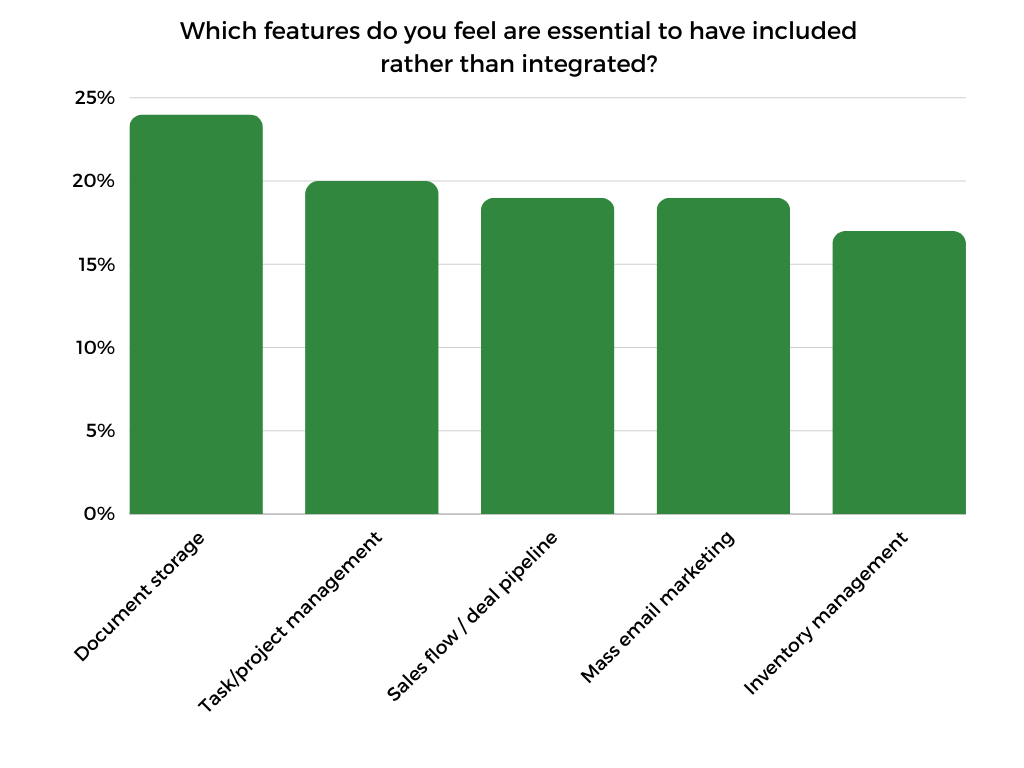
We also surveyed 200 users of general CRM platforms to see which features they considered most important. Document storage came out on top, followed closely behind by task management, sales pipeline visualization and mass emailing.
Below, we break down some of the features respondents deemed as important so that you know what to look for yourself. Many CRM providers offer free trials, plans and/or demos to help you test these features.

Contact Management
Managing customer data is the biggest function of CRM software. The tool you choose should provide one place to manage all information about clients. You can store basic contact details, such as address and number, while also tracking calls, emails and other interactions. Maybe there is also a spot to leave notes or comments to refer back to.
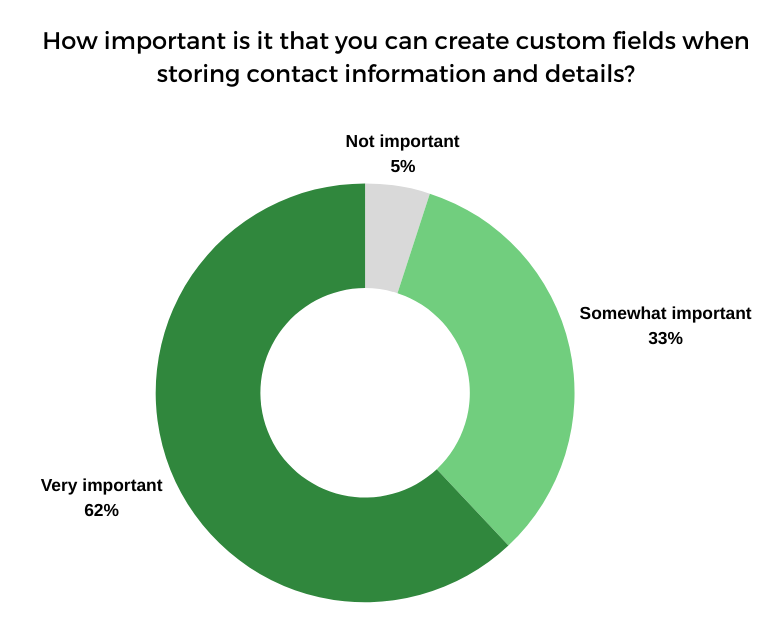
The ability to create custom fields to store unique pieces of information is also key. In our recent survey, about 95% of respondents agreed that custom fields were somewhat or very important in a CRM.

Interaction Tracking and Task Management
Interaction tracking is the part of the CRM where you manage how and when you communicate with your customers. Having an activity timeline to look back on can tell you what has and hasn’t worked well in the past so that you can plan your future interactions. Tangentially related, task management is where you organize your calls, emails, meetings and other to-do list items.
Most of the CRM platforms we tested have general tabs to look at interaction tracking and task management at a high level. They also have a way to go into each contact listing to see what tasks and activities relate to them. This helps ensure that no customers slip through the cracks.
| Task Management | Activity Tracking | |
| LionDesk | ✅ | ✅ |
| Market Leader | ❌ | ✅ |
| Wise Agent | ✅ | ✅ |
| Top Producer | ✅ | ❌ |
| monday.com | ✅ | ❌ |
| Zoho CRM | ✅ | ✅ |
| Pipedrive | ✅ | ✅ |
| HubSpot | ✅ | ✅ |
| Salesforce | ✅ | ✅ |
Integrations

If you already have other software that you’re using, make sure your CRM can integrate with them.
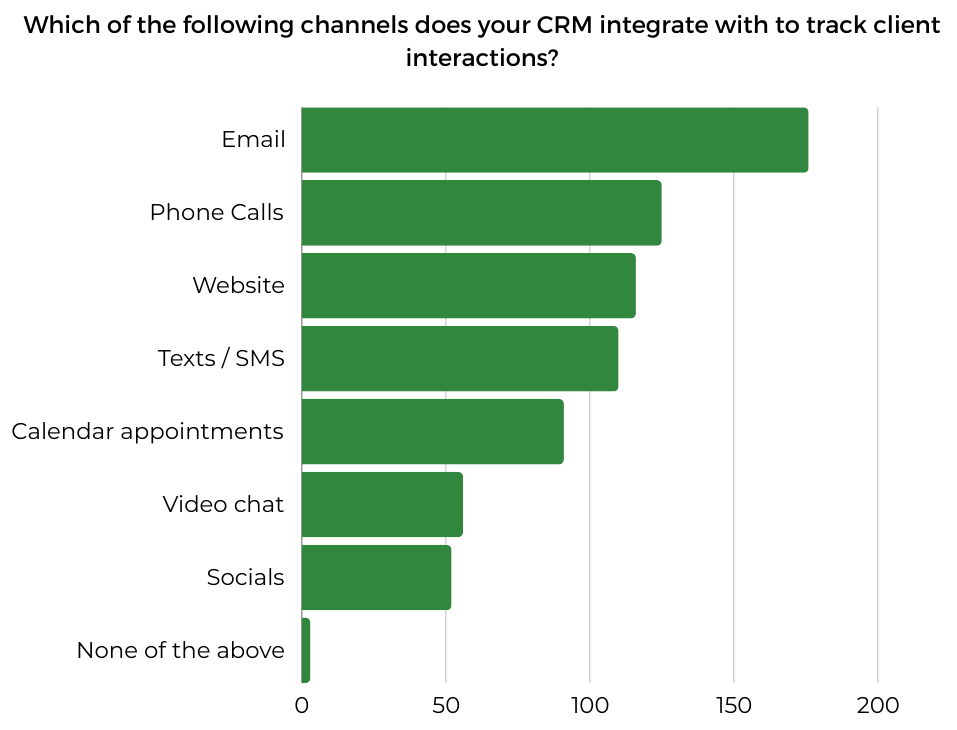
The providers on our list all have email integrations, allowing you to sync to or import contacts from Gmail and Outlook. Marketing software for social media, email and SMS is another common CRM integration, as it allows you to track campaign information and customer communication under one platform.
The availability of other integrations tends to vary widely. For instance, HubSpot has an app marketplace with over 1,500 integrations, while Top Producer’s marketplace is much smaller with about 150 integrations. This is a common trend you’ll see with general CRMs vs. CRMs for real estate; the real estate ones tend to have fewer options.
Pipeline Visualization
Your sales pipeline is a workflow that contains the stages contacts go through as they interact with and buy from you. In most CRM platforms, you can customize your pipeline, deciding what stages to put in it. You can then organize your contacts and leads based on what stage they’re in.
After setting up your pipeline, you want a way to visualize it. Having a visual can help you understand how quickly clients are moving through the pipeline, what issues are blocking sales from moving forward and other details that you can use to fine-tune your CRM strategy. Most CRMs have at least one visualization, such as a Kanban board or a Gantt chart. Real estate CRMs usually offer fewer views to choose from than general sales CRMs.
| Sales Pipeline Visualization | Multiple View Options | |
| LionDesk | ✅ | ❌ |
| Market Leader | ❌ | ❌ |
| Wise Agent | ✅ | ❌ |
| Top Producer | ❌ | ❌ |
| monday.com | ✅ | ✅ |
| Zoho CRM | ✅ | ✅ |
| Pipedrive | ✅ | ✅ |
| HubSpot | ✅ | ✅ |
| Salesforce | ✅ | ✅ |
Additional Considerations for Evaluating Real Estate CRM
There are many other factors — besides typical features — to keep in mind as you’re choosing a real estate CRM. Some secondary considerations include AI, customer support and ease of use.
AI Features
Artificial intelligence is top of mind for professionals in every industry. In our recent survey, over 90% of respondents said that AI tools are either a somewhat or very important part of a CRM’s feature set.
Consider what AI-powered tools might be able to streamline some of your daily tasks. Here’s a quick breakdown of the AI tools from the providers on our list to get you thinking:
| CRM Platform | AI Tool | What It Does |
| LionDesk | LionDesk Lead Assist Tool | Sends automated responses to client texts |
| Market Leader | – | – |
| Wise Agent | Wise Agent AI Bot | Sends automated follow-ups to leads |
| Top Producer | AI Smart Targeting Tool | Determines likely sellers in your area |
| monday.com | monday AI | Composes emails, summarizes call transcripts, generates project tasks |
| Zoho CRM | Zia AI Assistant | Scrapes the internet to fill in missing information in contact fields, suggests the best times to contact leads |
| Pipedrive | AI Sales Assistant | Tracks email opens, sends activity reminders, suggests updates to contact data |
| HubSpot | HubSpot AI | Generates emails, makes sales forecasts |
| Salesforce | Einstein AI | Generates emails and summaries, creates customized plans |
Customer Support
In our survey, customer support was ranked the third most important CRM factor after customization and unique features (e.g., AI tools). Because Salesforce and other complex CRM systems have a steep learning curve, access to customer support is essential for any questions you may have during onboarding.
Consider what contact methods (e.g., phone, email, chat) you would like access to. Also think about the hours of those channels. For example, are they available 24/7 or just during business hours? Keep in mind that availability usually depends on the plan you choose.
Reporting and Analytics
Many realtor CRMs lack the advanced reporting capabilities that general sales CRMs have. However, they sometimes track unique, property-specific metrics, such as commission reporting and forecasting. In terms of setting up the reporting dashboard, you want to look for customization. You should be able to add the charts, graphs and metrics you want to track.
Workflow and Lead Automation
One of the biggest reasons to implement CRM software is to automate processes to save time on administrative tasks. For CRMs with marketing features, such as HubSpot, you can usually automate when and what messages get sent. Additionally, many CRM tools can connect to or create lead sources. For example, they can create a sign-up form that you put on your website and then pull in any leads that use that form.
The process for setting up these automations varies for each tool, so user-friendliness is something to keep in mind as well. But, in many cases, some tinkering to set up automated processes can save you a ton of time and effort overall.
Ease of Use
Ultimately, the best CRM software for you is the one that you know how to use. Even if a platform has a ton of features, they’re only going to be helpful if you know how to navigate the interface to find and use them. Generally speaking, CRMs with robust feature sets tend to be more difficult to use than ones with basic features. However, you will want to test that theory by signing up for a free trial, plan or demo to see if that’s the case with the CRM you’re considering.
Bottom Line
A CRM for real estate can make all the difference for agents and brokers. The right one can help you manage customer data, track to-do items and strengthen client relationships.
Choosing a CRM requires some research. We have started that process for you by testing and ranking popular providers. LionDesk came out on top thanks to its user-friendly platform and huge feature set designed specifically for real estate professionals. Other real estate providers include Wise Agent for organizing leads, Market Leader for communicating with clients and Top Producer for managing property listings.
There are also general sales CRMs that you can customize to work for your real estate business. Monday.com and Zoho CRM are two of them that offer extensive customization. Pipedrive, HubSpot and Salesforce also made the list for being robust.
Frequently Asked Questions About Real Estate CRM
CRM stands for customer relationship management. If you hear someone talking about “a CRM,” they’re likely referring to CRM software, which is an app or platform that manages customers, leads and other sales pipeline information. For real estate, there are specific CRM tools that help agents and brokers manage buyers, sellers and properties.
CRM software for real estate can help agents with a variety of day-to-day tasks. For example, CRM benefits can include visualizing the sales pipeline, storing contact information, scheduling client meetings, communicating with customers and more.
Real estate CRM providers usually offer several plans. The starter plan can cost anywhere from $30 to $100 per user per month. By comparison, the starter plans for general sales CRMs that you can customize for real estate typically cost $10 to $50 per user per month. Real estate tools don’t typically have free plans, though they may have free trials and/or demos. General CRMs can have all three.
Real estate CRMs can be beneficial for real estate agents, brokers, property managers and other professionals in the industry who want a streamlined way to organize their sales pipeline and communicate with their clients.
How We Test the Best CRM for Real Estate
Customer relationship management (CRM) tools help businesses bring in new customers and nurture current ones. With different businesses come different business goals and CRM needs. So, the MarketWatch Guides team spent over 100 hours evaluating 13 providers to determine who each CRM is best for. We looked at big names, such as Salesforce and monday.com, as well as small providers, including Liondesk and Less Annoying CRM.
We conducted a survey in 2024 of 200 professionals who were currently using CRM or had used CRM within the past year. We analyzed the results of this survey to determine the following rating criteria:
- User Experience (15%)
- Features (30%)
- Pricing (30%)
- Customer Support (15%)
- Reputation and Credibility (10%)
Visit the full CRM methodology page for more details on our rating system.
link